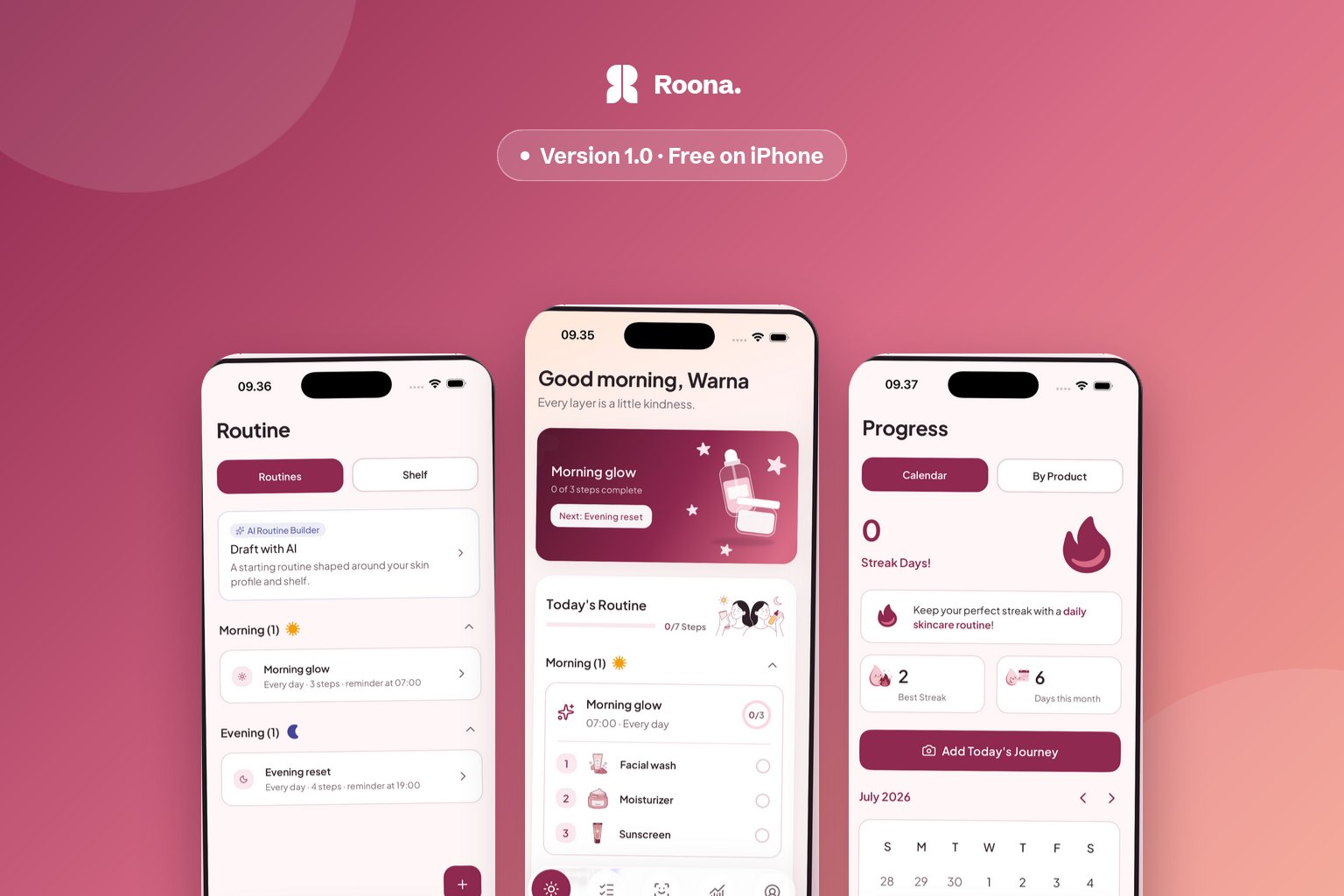
For about a year, every guide on this site ended the same slightly awkward way: here is how to keep a skin journal, and here is the app we are building to do it for you, which you cannot download yet. That sentence is finally retired. Roona 1.0 is on the App Store, free, for iPhone.
This is the first version Apple approved, so it is version 1.0 no matter what the internal branch was called. What follows is what is actually in it — and, because this is the post people will read before deciding whether to install, what is not.
What Roona is
Roona is a skincare journal. You build your morning and night routines, check the steps off as you do them, say in one tap how your skin feels, and take an occasional progress photo with a framing guide so the photos are worth comparing later. Six weeks in, you have something better than a memory of whether the new serum helped.
The journal lives on your device. It works with no connection, and you can use it without making an account at all — there is no signup wall between opening the app and logging your first routine. If you do sign in, the journal syncs to your account at no cost.
That is the whole product in one paragraph, and everything below is in service of it.
What is in the first release
Routines and the nightly log. Morning, night and custom routines with ordered steps and reminders that fire on your device. At the end of the day, one screen sweeps through what is left: finish the routine, log how your skin feels, add the photo, seal the day. Rest days you scheduled do not break a streak, because a streak that punishes a planned break is measuring the wrong thing.
Your shelf, and whether anything on it works. Every product you use, linked to the step it belongs to, with how long you have been on it and where it came from — including which clinic or doctor, if that is how you buy skincare. Pick any product and Roona shows the run of photos and entries since the day you started it.
Shelf scan. Point the camera at your actual shelf and Roona recognizes the products on it. Setting up a shelf is a photo rather than an evening of typing brand names.
Ingredient check. Photograph an ingredient list and Roona reads it, then explains how that formula sits against the skin profile you set up during onboarding. Three checks are free. The label photos are used for that one check and deleted when it finishes — they are not added to a database.
Skin readings. An optional AI reading of a scan you choose to submit. It leads with what your skin is doing well, caps concerns at two, and tells you which of your own entries a suggestion came from. There is no score. Your first reading is free.
What accumulates. Skin trends show the direction each dimension is moving across readings. Three active days in a week unlocks a Monday reflection written from that week's entries. At the end of a month, a report walks you through a before-and-after from your own photos and names one thing to focus on next. None of this exists on your first day, which is the point — it is what the app becomes if you keep the habit.
English and Bahasa Indonesia. The entire app is translated, including the AI readings, which are written in your language rather than machine-translated afterwards.
What it costs
The journal is free and stays free. Free accounts keep two active routines and ten open products at a time — archiving a routine or marking a product finished frees a slot, and nothing you wrote is ever deleted to make room. Your first skin reading and three ingredient checks are included.
Roona Plus is an optional subscription, monthly or yearly, that removes those limits and adds photo backup across devices, unlimited readings and ingredient checks, the routine builder, the shelf advisor, and the weekly and monthly reports. Prices differ by country and the exact figure appears in the app before you confirm anything. There is no free trial, which means there is nothing to forget to cancel.
What Roona does not do
It has no product database, so you cannot look up a moisturizer you do not own yet, and there is no barcode scanner. The ingredient check reads the label you put in front of the camera; it is useful in a store aisle and useless for browsing at home. If vetting products before you buy them is your main problem, an app built around a catalog will serve you better, and we have written that comparison honestly.
It does not diagnose anything. Roona describes visible patterns and what your own record says. Medical concerns belong with a professional.
And it is a first release. It has been in the store for days, not years. There will be bugs we have not seen yet, and the fastest way to get one fixed is to mail support@roona.app.
Why iOS first, and where Android is
Android is next and already the priority — the app is written to run on both. We shipped one platform first because two half-finished platforms would have meant a worse first version of each. If you are on Android, there is a form at the bottom of the homepage that will send you exactly one email the day it lands, and nothing else.
On privacy, briefly
Three kinds of photos, three different rules, enforced in the app rather than promised in a policy. Progress photos are yours and are never sent for analysis. Scan photos leave the device only for a reading you explicitly ask for, and never train models. Ingredient-label photos are used once for that check and deleted. You can delete any scan, any photo, or your whole account, from inside the app.
The privacy policy says the same thing at greater length.
Start with one entry
If you have been reading the guides here and tracking in a notebook, everything you already wrote still counts — the method does not change, only where it lives. And if you are starting from nothing, the useful move is not to design a perfect routine tonight. It is to log the one you already have, badly, for a week.
Keep reading
-
How to Choose a Skincare Tracking App You'll Still Open in Week Six
Most skincare trackers get abandoned by week three. Two things predict whether one actually works for you: how long a single entry takes on a bad night, and where your progress photos end up living. 28 July 2026 -
K-Beauty After 50: Ingredients That Actually Translate
K-beauty after 50: which ingredients actually translate across age groups, what to keep, what to swap, and how to layer for mature skin. 4 November 2026 -
Sorbet Nails: Soft Dopamine Manicure, Gentler Than Glazed
Sorbet nails are the soft dopamine manicure trend that is gentler than glazed. Learn the pastel colors, sheer finish, and steps to get the look at home. 3 November 2026